SQL
总的来说,SQL的语法并不复杂,其操作也算直观,主要是用来高效处理信息,管理database。只是一和python结合起来就会让我有点难受,week7主要的内容就是 1. SQL的操作语法 2. 嵌套处理 3. 与其他语言一起使用
官方笔记
有关flat-databases的内容官方笔记写的很好也不是本节课重点,略过了。
SQL基本知识
- Relational databases store data in rows and columns in structures called tables(表).
-
SQL allows for four types of commands(CRUD):
Create Read Update Delete
-
sqlite3是一个轻量化sql数据库,内置。
SQL的操作语法
基本配置
- We can create a database with the SQL syntax
CREATE TABLE table (column type, ...),直接在terminal上写,跑,但是要先进入sql模式 - We can create a SQL database at the terminal by typing
sqlite3 favorites.db.- 一切带了
.的指令都是在配置sqlite本身 - 退出是
.quit.
- 一切带了
- We can put
sqliteintocsvmode by typing.mode csv. Then, we can import our data from our csv file by typing.import favorites.csv favorites,导入成csv会自动读取第一排作为“key” -
We can type
.schemato see the structure of the database.这个很重要,后面也经常用,方便查结构,如果需要在db里只查一个table,.shcema table即可。 -
We can track the speed of our queries by executing
.timer oninsqlite3.
SQL的SELECT语法
-
You can read items from a table using the syntax
SELECT columns FROM table.- For example, you can type
SELECT * FROM favorites;which will print every row in favorites. - You can get a subset of the data using the command
SELECT language FROM favorites;.其实不用大写指令也行,只是看起来会更清楚
- For example, you can type
-
SQL supports many commands to access data, including:
AVG COUNT DISTINCT LOWER MAX MIN UPPER (可以试着玩一玩)
-
you can type
SELECT COUNT(*) FROM favorites;. Further, you can typeSELECT DISTINCT language FROM favorites;to get a list of the individual languages within the database. You could even typeSELECT COUNT(DISTINCT language) FROM favorites;to get a count of those. DISTINCT是去重,只保留唯一的值 -
临时补充:
SELECT * FROM favorites;中的*表示 所有列, 意思是表中选出所有行的所有列,输出结果就是整张表的内容。
而对于SELECT COUNT(*) FROM favorites;中的COUNT(*)的意思是统计表中所有行的数量,会遍历整张表,遇到一行+1,不管值是什么,而COUNT(column)会统计某一列中非NULL值的数量,同理对于AVG(column)也可以替换count的位置去计算是数值类型的列 -
SQL offers additional commands we can utilize in our queries:
Notice that we use -- to write a comment in SQL.WHERE -- adding a Boolean expression to filter our data,有点像if LIKE -- filtering responses more loosely ORDER BY -- ordering responses LIMIT -- limiting the number of responses GROUP BY -- grouping responses together -
SELECT COUNT(*) FROM favorites WHERE language = 'C' AND problem = 'Hello, World';. Notice how the AND is utilized to narrow our results.注意引用最好用单引号!!列名不需要(其实也是可以写的),但是其他的一定要带!!- 引用中也有`?那么就写两个``表示转义
-
Similarly, we could execute
SELECT language, COUNT(*) FROM favorites GROUP BY language;. This would offer a temporary table that would show the language and count.- We could improve this by typing
SELECT language, COUNT(*) FROM favorites GROUP BY language ORDER BY COUNT(*) DESC;. This will order the resulting table by the count.并且由于本身是从小到大,加了DESC又会往从大到小的顺序来。 - Likewise, we could execute
SELECT COUNT(*) FROM favorites WHERE language = 'C' AND (problem = 'Hello, World' OR problem = 'Hello, It''s Me');. Do notice that there are two '' marks as to allow the use of single quotes in a way that does not confuse SQL. - moreover,
SELECT COUNT(*) FROM favorites WHERE language = 'C' AND problem LIKE 'Hello, %';to find any problems that start with Hello, (including a space). - We can even create aliases(别名), like variables in our queries:
SELECT language, COUNT(*) AS n FROM favorites GROUP BY language ORDER BY n DESC;. - 如果说order一次后还会出现相同项,可使用多项排序(注意,也可以允许text型按字母顺序排序)
ORDER BY a,b就是先看a,相同再看b,如果一会正一会反:ORDER BY a ASC, b DESC
- We could improve this by typing
-
Finally, we can limit our output to 1 or more values:
SELECT language, COUNT(*) AS n FROM favorites GROUP BY language ORDER BY n DESC LIMIT 1;. -
注意,如果一行输完后没有
;那么sql就会等待你继续输入,输入就好了
SQL的INSERT,DELETE,UPDATE语法
- We can also INSERT into a SQL database utilizing the form
INSERT INTO table (column...) VALUES(value, ...);. - We can execute
INSERT INTO favorites (language, problem) VALUES ('SQL', 'Fiftyville');. -
You can verify the addition of this favorite by executing
SELECT * FROM favorites;. -
DELETE allows you to delete parts of your data. For example, you could
DELETE FROM favorites WHERE Timestamp IS NULL;. This deletes any record where the Timestamp is NULL. 这个判断null的语法是IS,很骚气。 -
you can execute
UPDATE favorites SET language = 'SQL', problem = 'Fiftyville';. This will result in overwriting all previous statements where C and Scratch were the favorite programming language.SET相当于设置嘛,修改的意思 - Notice that these queries have immense power. Accordingly, in the real-world setting, you should consider who has permissions to execute certain commands and if you have backups available!
示例分析:IMDb
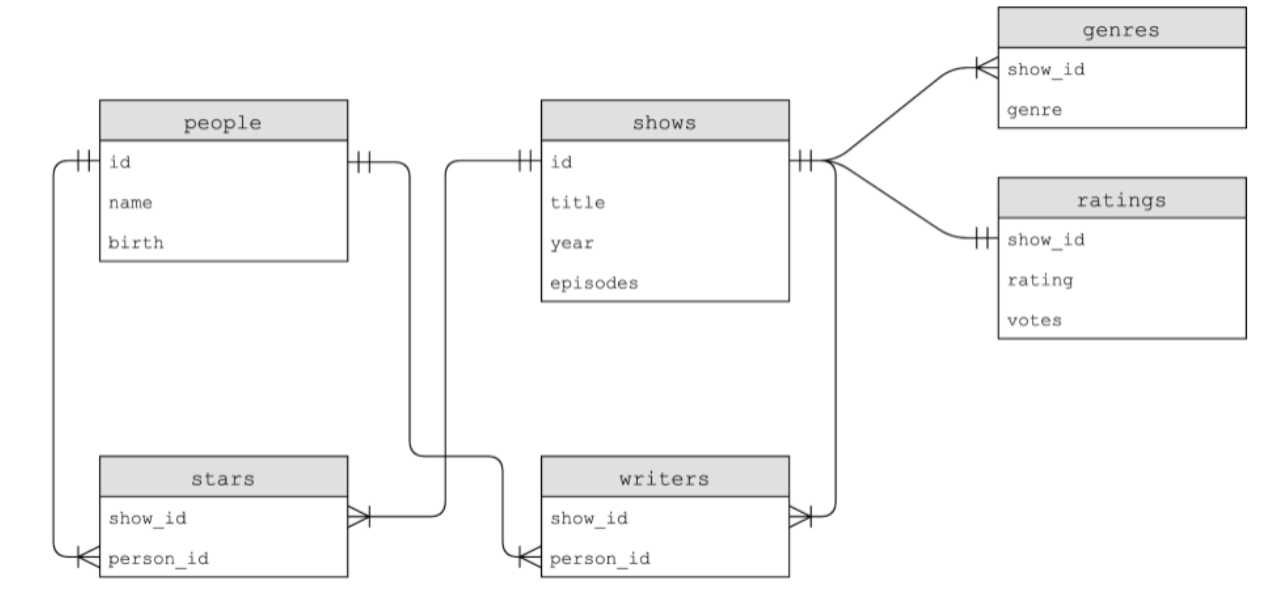
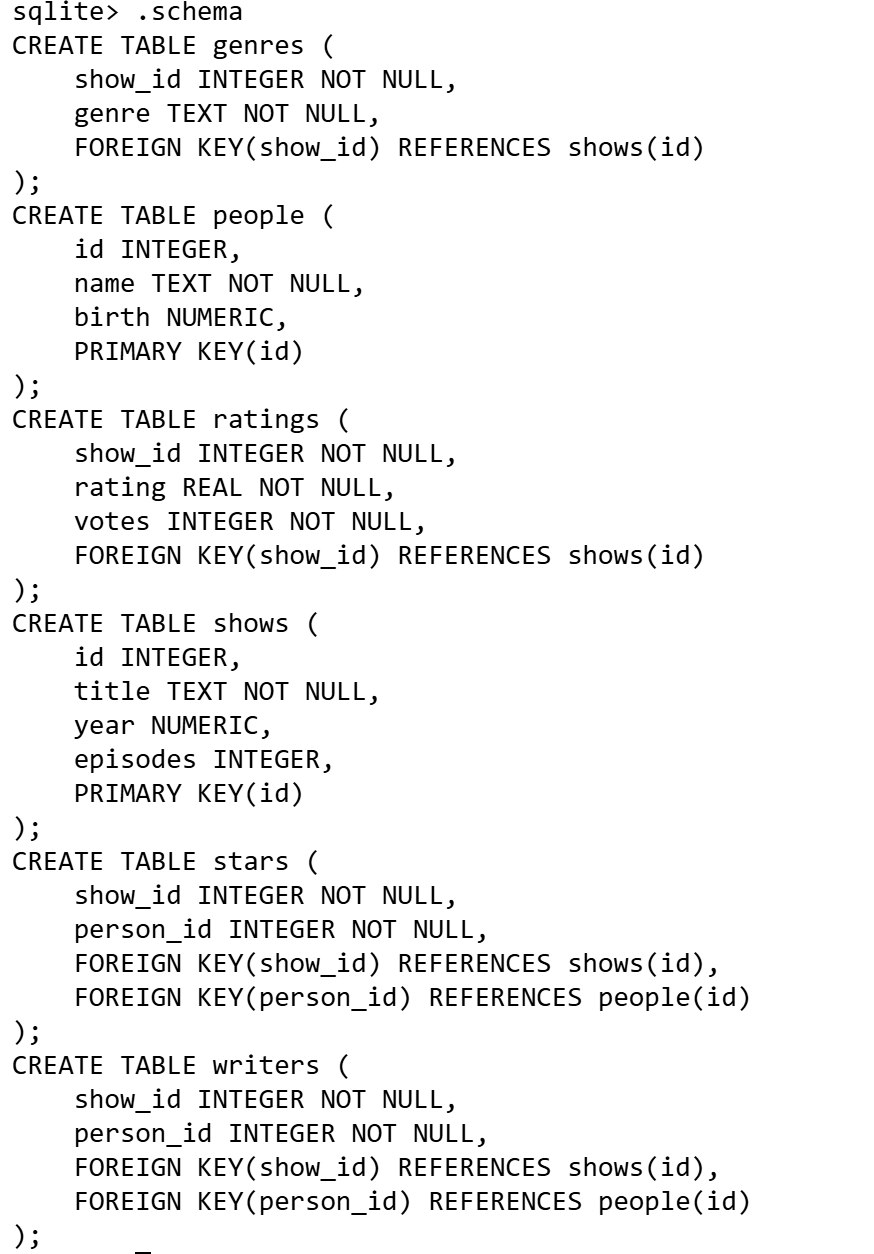
一个大的database,里面含有很多sheet/table。
-
As you can see,
show_idexists in all of the tables. In theshowstable, it is simply calledid. This common field between all the fields is called a key. Primary keys are used to identify a unique record in a table. Foreign keys are used to build relationships between tables by pointing to the primary key in another table. You can see in the schema ofratingsthatshow_idis a foreign key that referencesidinshows. -
In sqlite, we have five data types, including:
BLOB -- binary large objects that are groups of ones and zeros INTEGER -- an integer NUMERIC -- for numbers that are formatted specially like dates REAL -- like a float TEXT -- for strings and the like -
Additionally, columns can be set to add special constraints:
NOT NULL UNIQUE -
We can further limit this data down by executing
SELECT show_id FROM ratings WHERE rating >= 6.0 LIMIT 10;However, we don’t know what show eachshow_idrepresents. You can discover what shows these are by executingSELECT * FROM shows WHERE id = 626124; -
We can further our query to be more efficient by executing:
SELECT title
FROM shows
WHERE id IN (
    SELECT show_id
    FROM ratings
    WHERE rating >= 6.0
    LIMIT 10
)  //嵌套!!!
JOIN
-
How could we combine tables temporarily? Tables could be joined together using the
JOINcommand. -
Execute the following command:
SELECT * FROM shows
  JOIN ratings on shows.id = ratings.show_id
  WHERE rating >= 6.0
  LIMIT 10;
- We can learn more about the show The Office and the actors in that show by executing the following command:
SELECT name FROM people WHERE id IN
    (SELECT person_id FROM stars WHERE show_id =
        (SELECT id FROM shows WHERE title = 'The Office' AND year = 2005));
逆天的三层嵌套,建议从里面开始读。 Notice this results in a wider table than we have previously seen.
- We find all the shows in which Steve Carell starred:
SELECT title FROM shows WHERE id IN
    (SELECT show_id FROM stars WHERE person_id =
        (SELECT id FROM people WHERE name = 'Steve Carell'));
-
This results in a list of titles of shows wherein Steve Carell starred.
- This could also be expressed in this way:
SELECT title FROM shows, stars, people
WHERE shows.id = stars.show_id
AND people.id = stars.person_id
AND name = 'Steve Carell';
- This could also be expressed in this way:
-
The wildcard
%operator can be used to find all people whose names start withSteve Cone could employ the syntaxSELECT * FROM people WHERE name LIKE 'Steve C%';.
Indexes
-
While relational databases have the ability to be faster and more robust(耐操性) than utilizing a
CSVfile, data can be optimized within a table using indexes.Indexes can be utilized to speed up our queries. -
we can create an index with the syntax
CREATE INDEX title_index ON shows (title);. This tellssqlite3to create an index and perform some special under-the-hood optimization relating to this columntitle.其实无论index具体结构是怎样的,它是花了更多空间来达到时间的节省
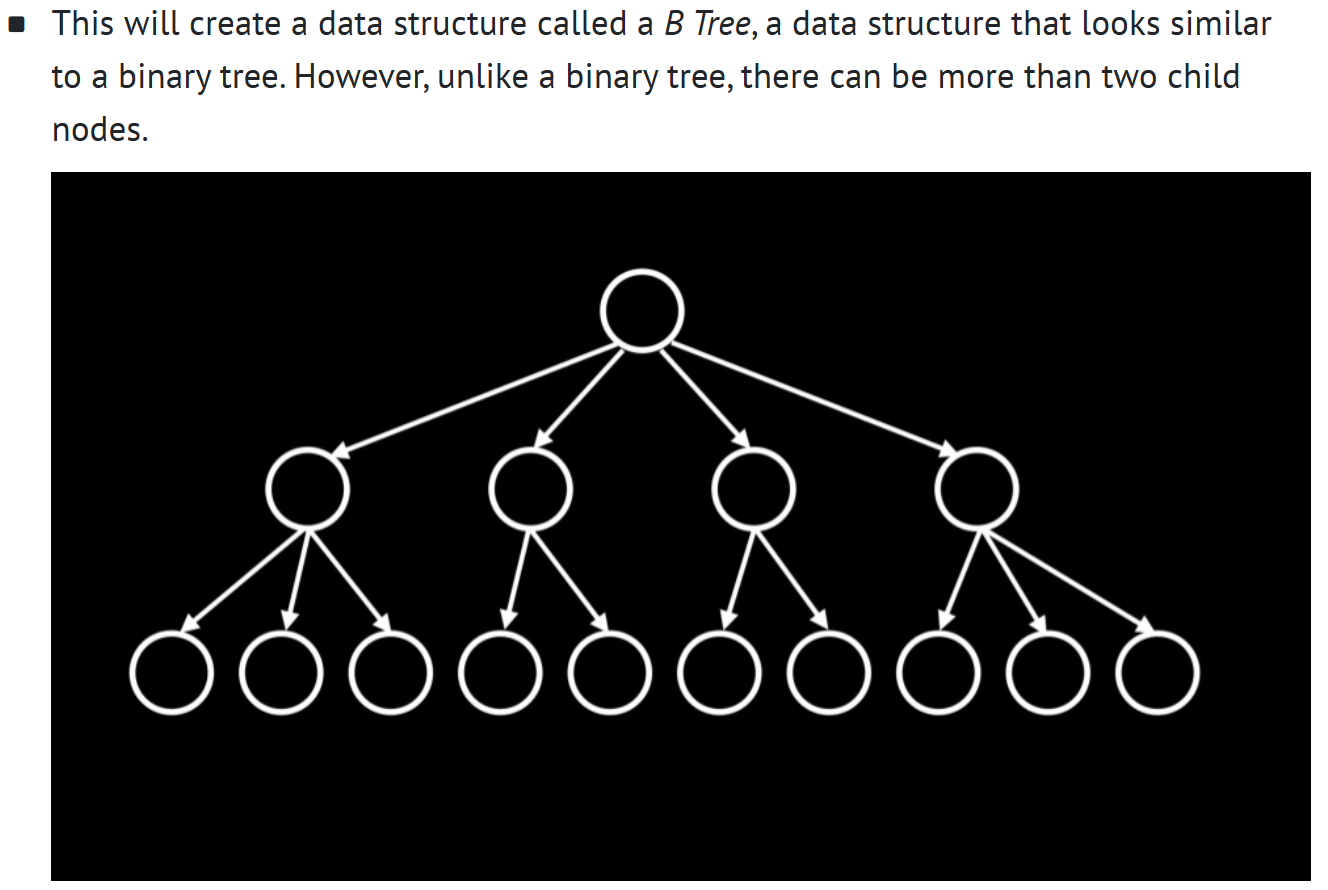
- Unfortunately, indexing all columns would result in utilizing more storage space. Therefore, there is a tradeoff for enhanced speed.
与其他语言一起使用 LIKE Python
- Similar to previous uses of the CS50 Library, this library will assist with the complicated steps of utilizing SQL within your Python code. (训练轮)
接下来可以看看favorite8.py了
- Notice that db = SQL("sqlite:///favorites.db") provides Python the location of the database file. Then, the line that begins with rows executes SQL commands utilizing db.execute. Indeed, this command passes the syntax within the quotation marks to the db.execute function. We can issue any SQL command using this syntax. Further, notice that rows is returned as a list of dictionaries. In this case, there is only one result, one row, returned to the rows list as a dictionary.
- rows返回列表,列表元素是字典,
rows[0]就是一个字典,print(rows[0])输出一整个字典,key 和 value一起出现,print(row["n"])输出的就是row这个字典中key"n"对应的值
不太重要的:
-
Race Conditions: Utilization of SQL can sometimes result in some problems.
You can imagine a case where multiple users could be accessing the same database and executing commands at the same time.
This could result in glitches(故障) where code is interrupted by other people’s actions. This could result in a loss of data.
Built-in SQL features such asBEGIN TRANSACTION,COMMIT, andROLLBACKhelp avoid some of these race condition problems. -
SQL Injection Attacks: 必须假设用户输入的文本是不安全的,时刻防范。
lab中知识点
SELECT title FROM movies
WHERE id IN (
    SELECT movie_id FROM stars WHERE person_id IN
    (SELECT id FROM people WHERE name = 'Bradley Cooper')
    AND (SELECT id FROM people WHERE name = 'Jennifer Lawrence')
);
SELECT title
  FROM movies, stars, people
 WHERE movies.id = stars.movie_id  -- 等价于JOIN
   AND people.id = stars.person_id
   AND name = "Johnny Depp"
   AND title IN
       (SELECT title
          FROM movies, stars, people
         WHERE movies.id = stars.movie_id
           AND people.id = stars.person_id
           AND name = "Helena Bonham Carter");
- 高阶操作
WITH a AS ()即可把()内的一系列操作缩写为a,示例:WITH bacon_movies AS ( SELECT movie_id FROM stars JOIN people ON people.id = stars.person_id WHERE people.name = 'Kevin Bacon' ) SELECT DISTINCT p.name FROM people p JOIN stars s ON p.id = s.person_id WHERE s.movie_id IN (SELECT movie_id FROM bacon_movies);